Contents
Summary Machine requirements What "interconnected" means What RTIndustry does Evidence for the expert The dossier for the expert Timing and upkeep FAQ Sources and disclaimerSummary
Italy's 2026 hyper-depreciation (iperammortamento) lets companies deduct an increased cost for investments in new "Industry 4.0" capital goods made from 1 January 2026 to 30 September 2028. The increase is 180% up to €2.5 million of investment, 100% from €2.5 to €10 million and 50% from €10 to €20 million.
For a machine tool the key point is interconnection: the machine must exchange data with the company's information systems, and an expert must certify it in a sworn technical report, mandatory for any amount. Without interconnection the incentive does not apply, even if the machine has every other feature.
Machine requirements
Machines in Annex IV (category 1: assets controlled by computer systems) need 5 mandatory features and at least 2 of the 3 additional ones.
| Requirement | What it asks | RTIndustry's contribution |
|---|---|---|
| Mandatory | ||
| 1. Computer control | Operation managed by CNC or PLC | A feature of the machine; RTIndustry reads the control. |
| 2. Interconnection with IT systems | Data exchange with remote loading of instructions and/or part programs | Receives work orders from the ERP (item, program, quantity, due date) and, with Send to machine, copies the part program into the CNC folder; returns progress to the ERP. |
| 3. Automated integration | With logistics, the supply network or other machines | Reports parts, scrap, times and material consumption; with the warehouse module it issues materials at job end or leaves stock to the ERP. |
| 4. Simple human-machine interface | Simple, intuitive use | Operator panel on tablet or PC with progress, state, alarms and job documents. |
| 5. Safety | Compliance with safety, health and hygiene rules | A feature of the machine (CE marking and documentation). |
| Additional (at least 2 of 3) | ||
| Remote maintenance, diagnosis, control | Diagnosis and control at a distance | State, alarms with duration and machine values viewable from any PC or tablet on the company network. |
| Continuous monitoring | Working conditions and process parameters monitored continuously | Continuously records state, program, part counter, alarms and energy use, with history, OEE and reports. |
| Integration with simulation | Model of the machine's behaviour (digital twin) | Not an RTIndustry feature: usually covered by CAM or the machine builder. |
The table shows the software's contribution: checking each requirement is up to the expert, on the real machine.
What "interconnected" means
- Two-way exchange: the machine receives instructions from the company system and returns production data. A link that only "reads" the machine is not enough.
- Documented, recognised protocols such as OPC UA, Modbus or MQTT.
- Unique identification of the machine on the company network, for example a dedicated IP address.
- Useful for production traceability.
What RTIndustry does
| Direction | What flows |
|---|---|
| From the ERP to the machine | Work orders with item, customer, program, quantity and due date, via REST API, database exchange table or MQTT; part program copied into the CNC network folder (or the Heidenhain program folder). |
| From the machine to the ERP | Job state, good and scrap parts, time per state, cycle time, material and energy consumption, job start and end. |
- Machine connection: OPC UA, FANUC FOCAS, Heidenhain DNC, Modbus TCP; Modbus energy meter. Works with mixed fleets.
- One workstation per machine, with its own address, data and licence: each machine is uniquely identified.
- On premises, on the company network, no mandatory cloud.
Evidence for the expert
- Timeline: calls received from the ERP with their result, state changes, running program, connection lost and restored, alarms, counted parts, with the machine values at any moment.
- Audit package: exports the chosen period (up to 31 days) with the timeline in CSV, machine value changes and a summary, with operator names replaced by numbers.
- Activity log exportable to CSV, work order history and period reports.
The interconnection dossier for the expert
From version 2.10.0 RTIndustry prepares by itself, for each machine, an interconnection dossier to hand to the expert: an A4 document to print or save as PDF, in the chosen language. The dossier is included in the RTIndustry licence of every machine: no extra module to buy.
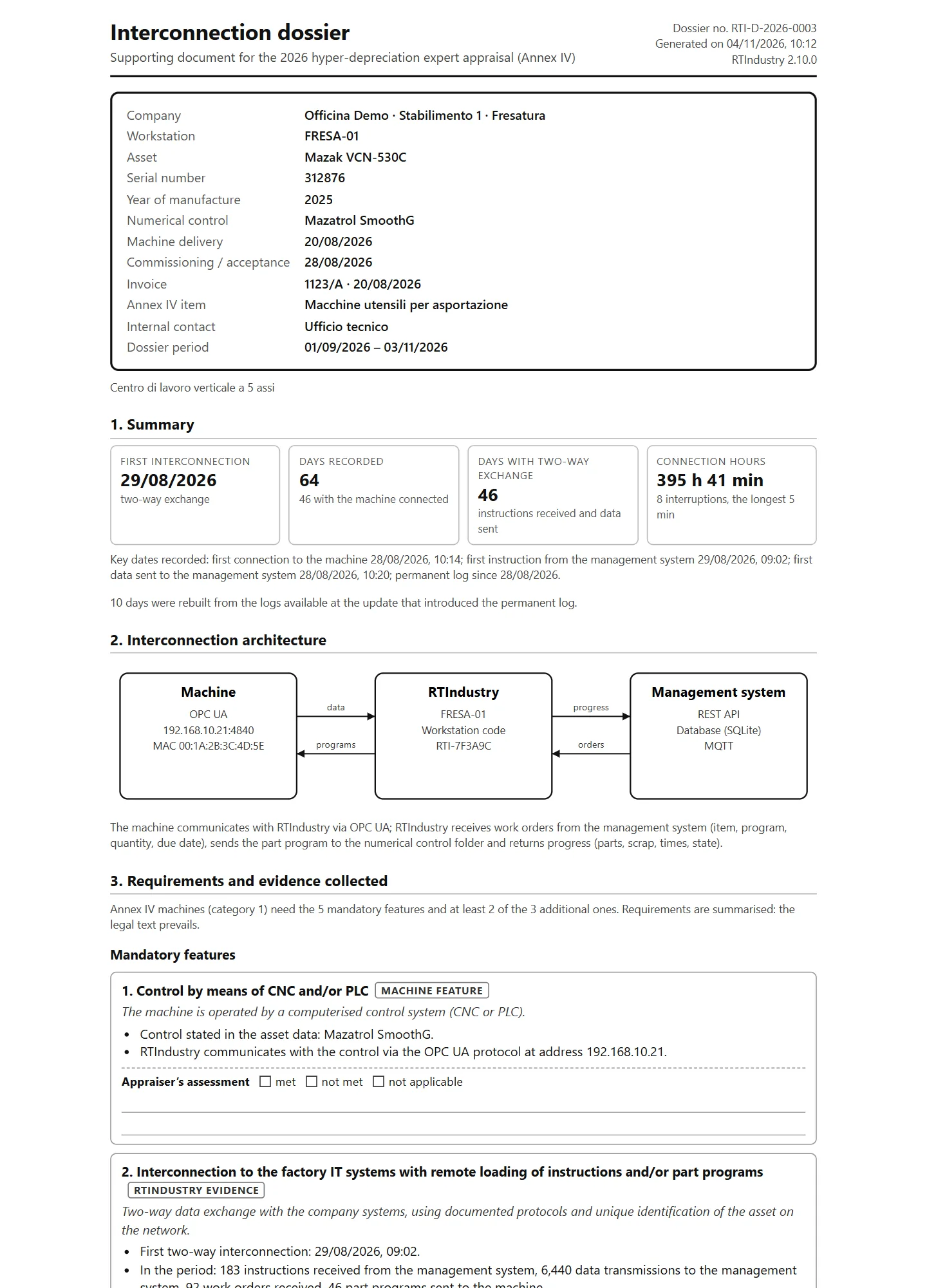
- Asset data: manufacturer, model, serial number, year, numerical control, delivery and commissioning dates, invoice, network identification (IP and MAC address).
- Date of the first two-way interconnection, days recorded, days with two-way exchange, connection hours and interruptions.
- Diagram machine ↔ RTIndustry ↔ ERP with the active protocols and channels.
- The Annex IV requirements, each with the evidence collected and an empty box for the expert's assessment.
- A sample of the exchanges with the ERP (date, channel, action, work order, result) and day-by-day continuity, from the permanent log RTIndustry keeps from day one.
- A digital fingerprint (SHA-256) and a number: the expert can check on the company PC that the document has not been altered.
Over the years RTIndustry saves a half-yearly report by itself, reminds the periodic notices and warns if the machine stays disconnected for too long. For experts there is a two-page sheet (PDF, in Italian) explaining what they find in the dossier and how to verify it.
Timing and upkeep
- The application goes through the GSE with several notices: a preliminary one, a confirmation with the down payment and the completion notice with the technical report and accounting certification, by 15 November 2028, followed by periodic notices (20 January and 30 June each year). Delays can forfeit the benefit.
- The benefit starts in the period the machine is actually interconnected.
- Interconnection must be maintained over the years: if it is lost, the remaining benefit may be revoked. RTIndustry keeps the link active, the timeline flags interruptions with their duration and the administrator is alerted if the machine stays disconnected.
FAQ
Is installing RTIndustry enough to obtain the hyper-depreciation?
No. You need a new asset with the Industry 4.0 features required by law, the sworn technical report and the notices to the GSE. RTIndustry handles the interconnection and keeps the evidence to show the expert.
Does it need the cloud or a permanent internet connection?
No. RTIndustry runs on the company network with a built-in database. The internet is only used for periodic licence checks, and the software keeps working offline.
Does the interconnection dossier cost extra?
No. It is included in the RTIndustry licence of every machine, from version 2.10.0: no additional module. Each machine has its own dossier, with its own data and its own date of first interconnection.
Our ERP has no ready-made integration
RTIndustry offers three equivalent channels: REST API, database exchange table and MQTT. The ERP vendor will find everything in the ERP and MES integration guide.
Sources and disclaimer
References: Italian Budget Law 2026 (Law no. 199 of 30 December 2025, article 1, paragraphs 427-436) and the implementing decree of the Ministry of Enterprises and Made in Italy and the Ministry of Economy and Finance, published on 11 June 2026.
General information updated to October 2026; it is not tax or legal advice. Requirements, deadlines and procedures must be checked with your accountant and with the expert certifying the asset, against the official texts and GSE guidance.