Monitor your CNC machines
in real time.
RTIndustry connects CNCs and PLCs to the shop-floor network: it counts parts, measures times and consumption, calculates OEE and organizes work orders. A single Windows service, used in the browser on PCs, tablets and phones.
Request a demo See how it works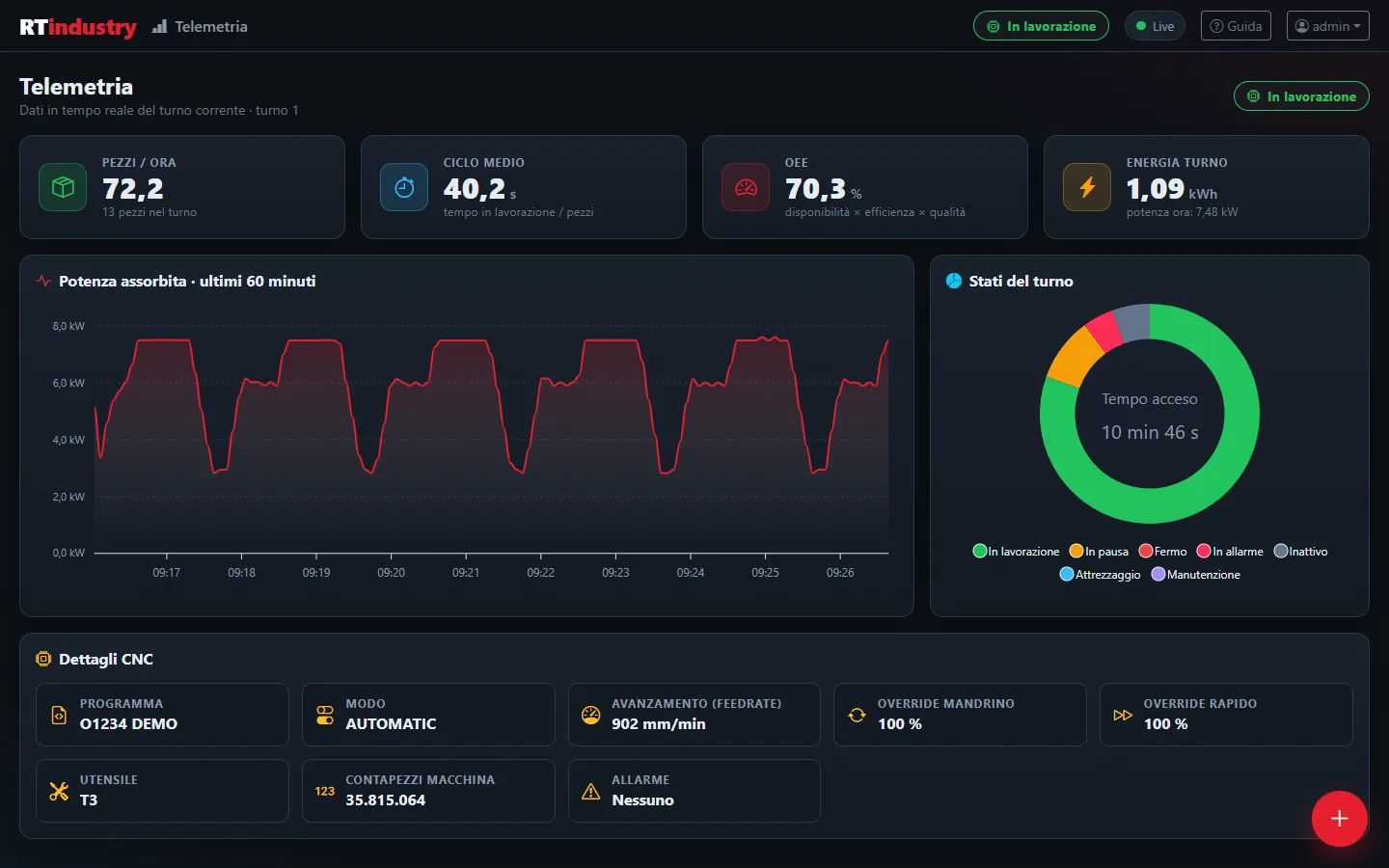
Your machines produce data.
But are you using it?
Many machine shops still work without really knowing how much their machines produce, how long they stand still and why.
Zero visibility
You do not know whether the machine is running, in alarm or stopped until someone goes and checks.
Data on paper
Parts, scrap and times are written down by hand: the data arrives late, incomplete or wrong.
Unknown OEE
Without reliable data you cannot measure real efficiency: decisions are based on gut feeling, not on numbers.
RTIndustry 2.0
A single program, installed on a shop-floor PC: it collects data from the machine even with the browser closed and shows it to whoever needs it, from the operator to the production manager.
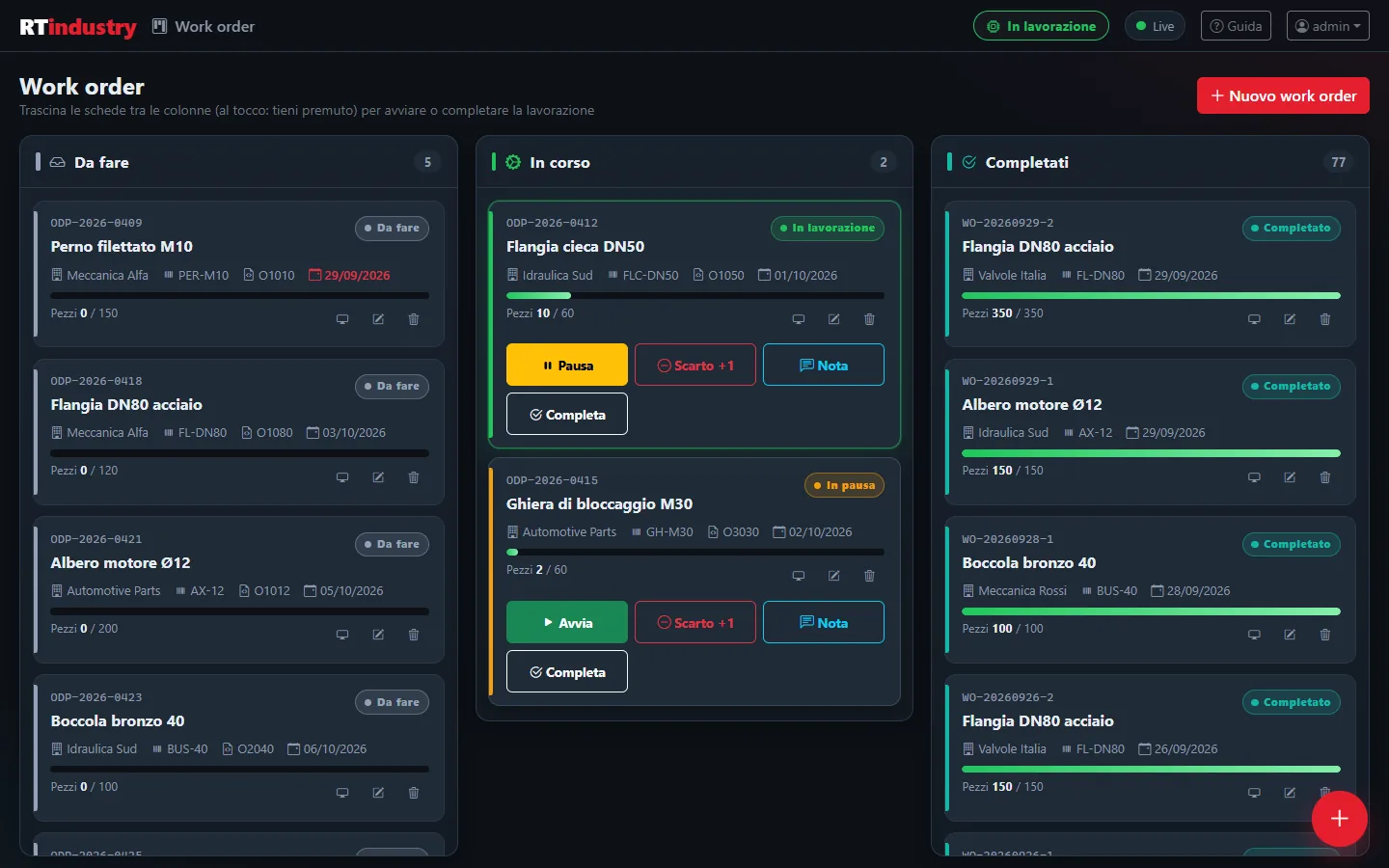
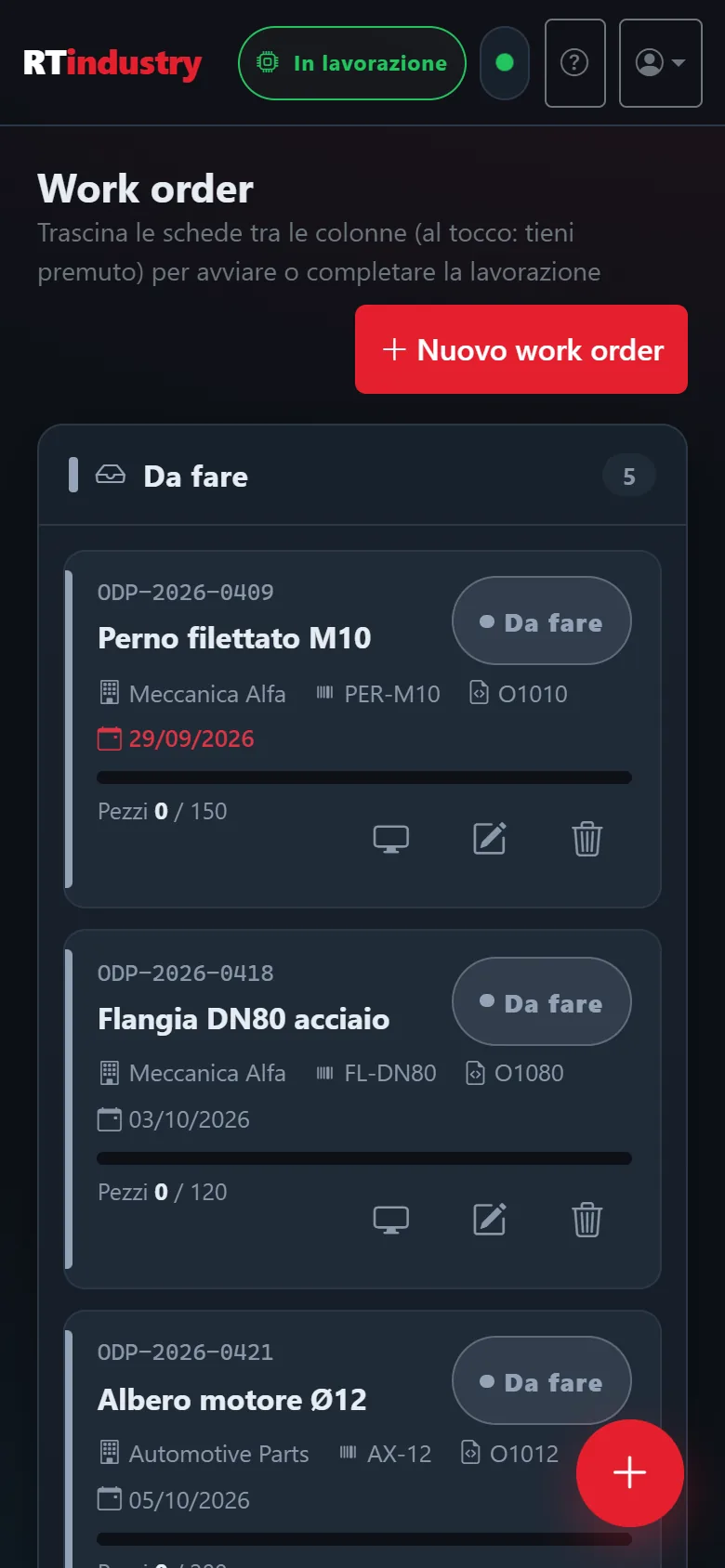
Jobs on a Kanban board
Each work order says what to produce and how many parts. You drag it from one column to another to start, pause or complete it, even with a finger on a tablet.
- To do, In progress and Completed columns
- Parts, customer, part number, program and due date (in red if overdue)
- Only one work order in progress at a time: parts always go to the right job
- If the machine starts without a job, RTIndustry creates one automatically and loses no parts
- Quick buttons: Pause/Start, Scrap +1, Note, Complete
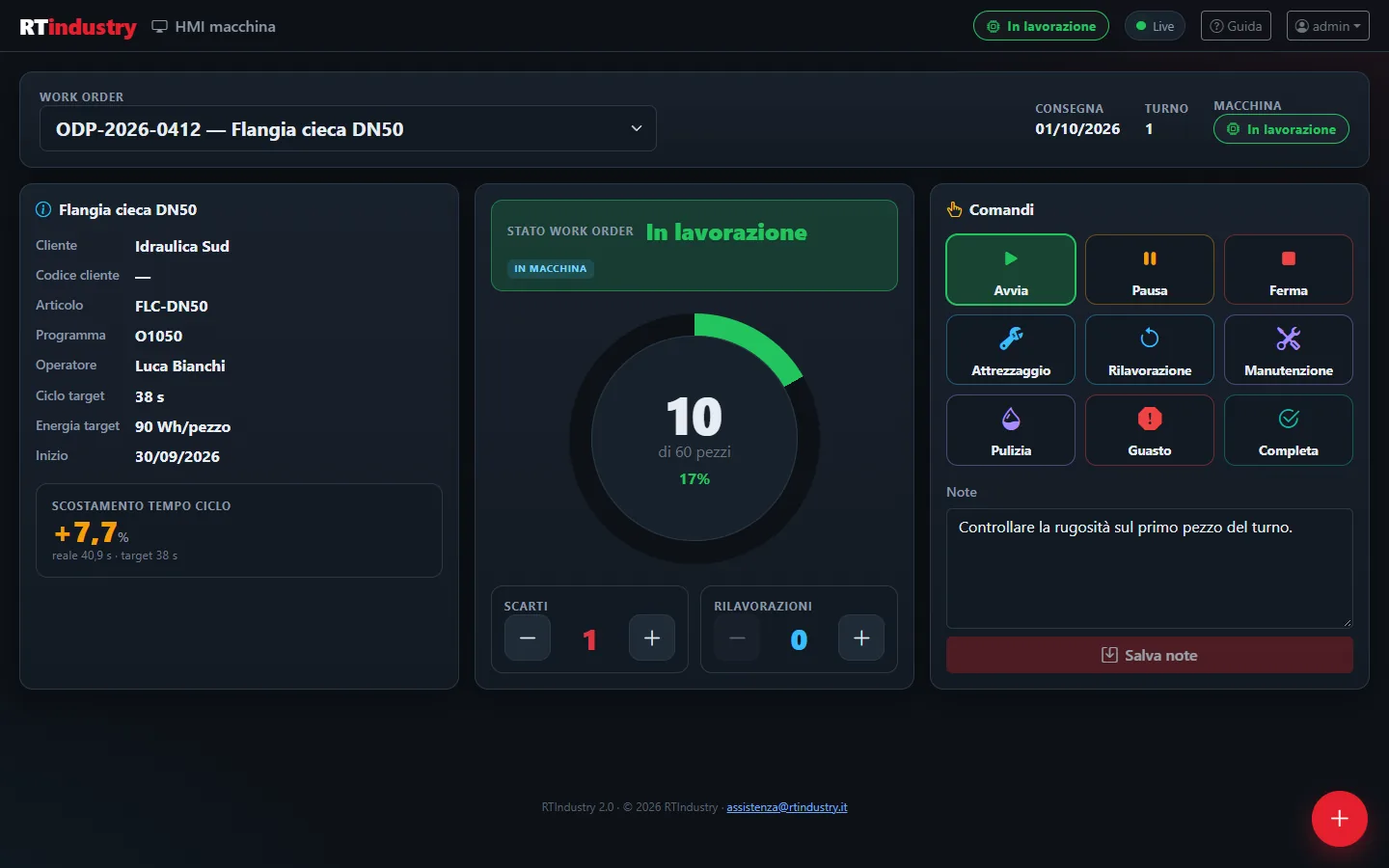
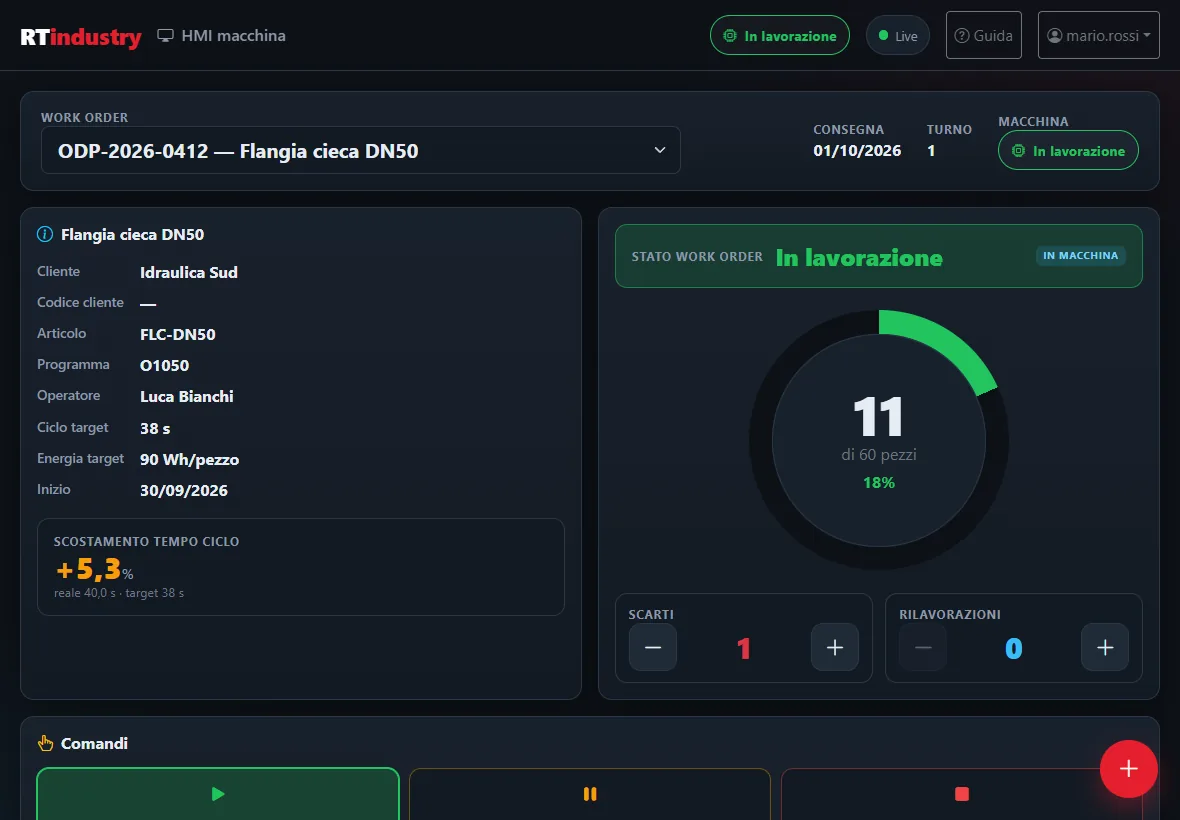
The operator's screen at the machine
Large, readable and designed for touch: at a glance the operator sees how far the job has got and records scrap, stops and notes without paper.
- Progress ring: good parts compared with required parts
- Cycle time deviation from the target time (slower in red, faster in green)
- Scrap and rework with + and −
- States: Start, Pause, Stop, Set-up, Rework, Maintenance, Cleaning, Fault, Complete
- Active alarm highlighted and notes for the next shift
The current shift, updated every second
How the machine is doing right now: production rate, cycle time, efficiency and consumption, with the details read from the numerical control.
- Parts per hour, average cycle, OEE and shift energy
- Chart of the power drawn over the last hour
- Breakdown of shift time by state
- CNC details: program, feed rate, override, tool
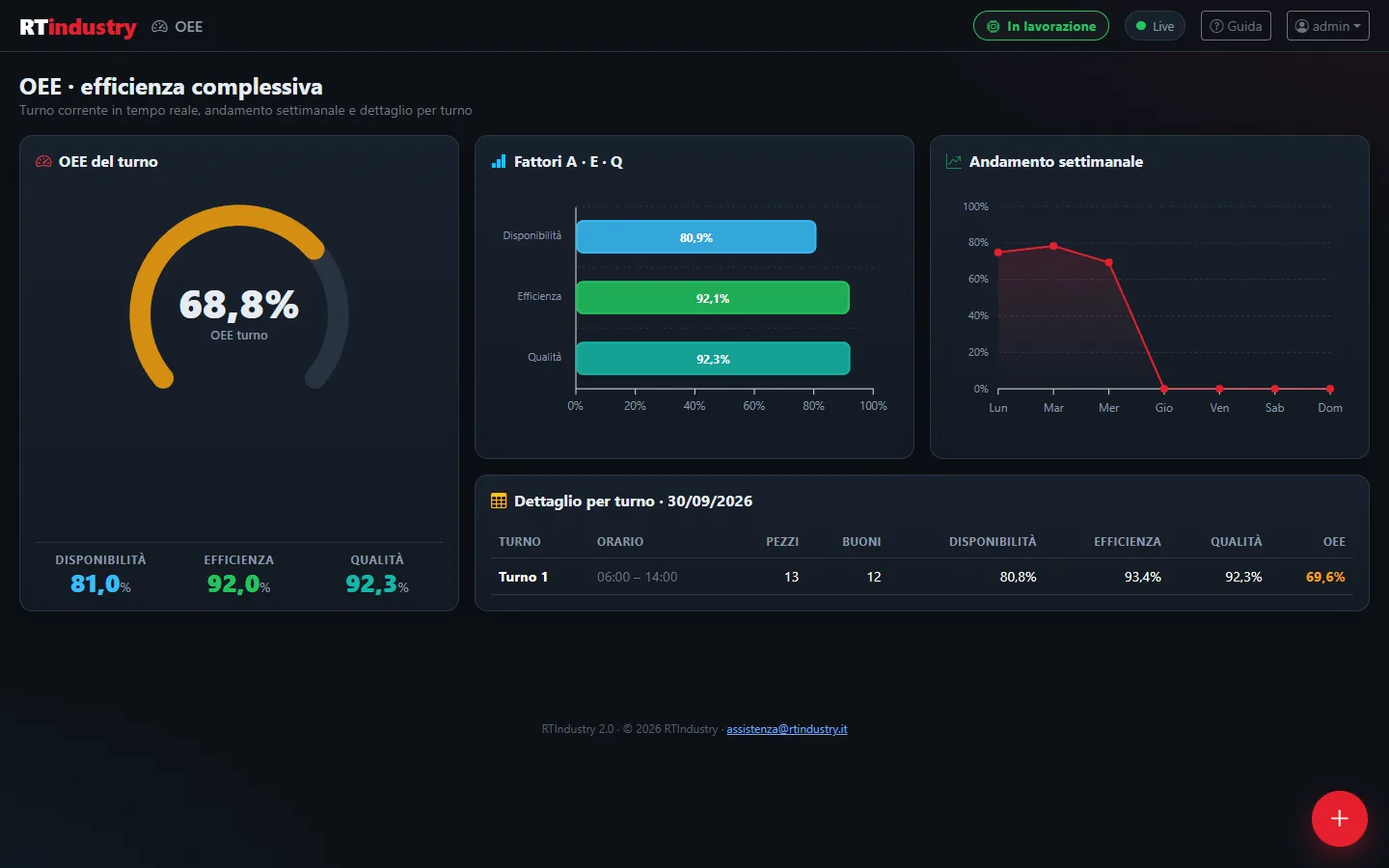
OEE calculated automatically, shift by shift
OEE (Overall Equipment Effectiveness) is the product of three factors. RTIndustry calculates them from the machine data, with no manual input.
- Availability: for how much of the shift the machine worked
- Performance: whether it worked at the speed set by the target time
- Quality: how many parts are good
- Weekly trend and breakdown by shift for the day
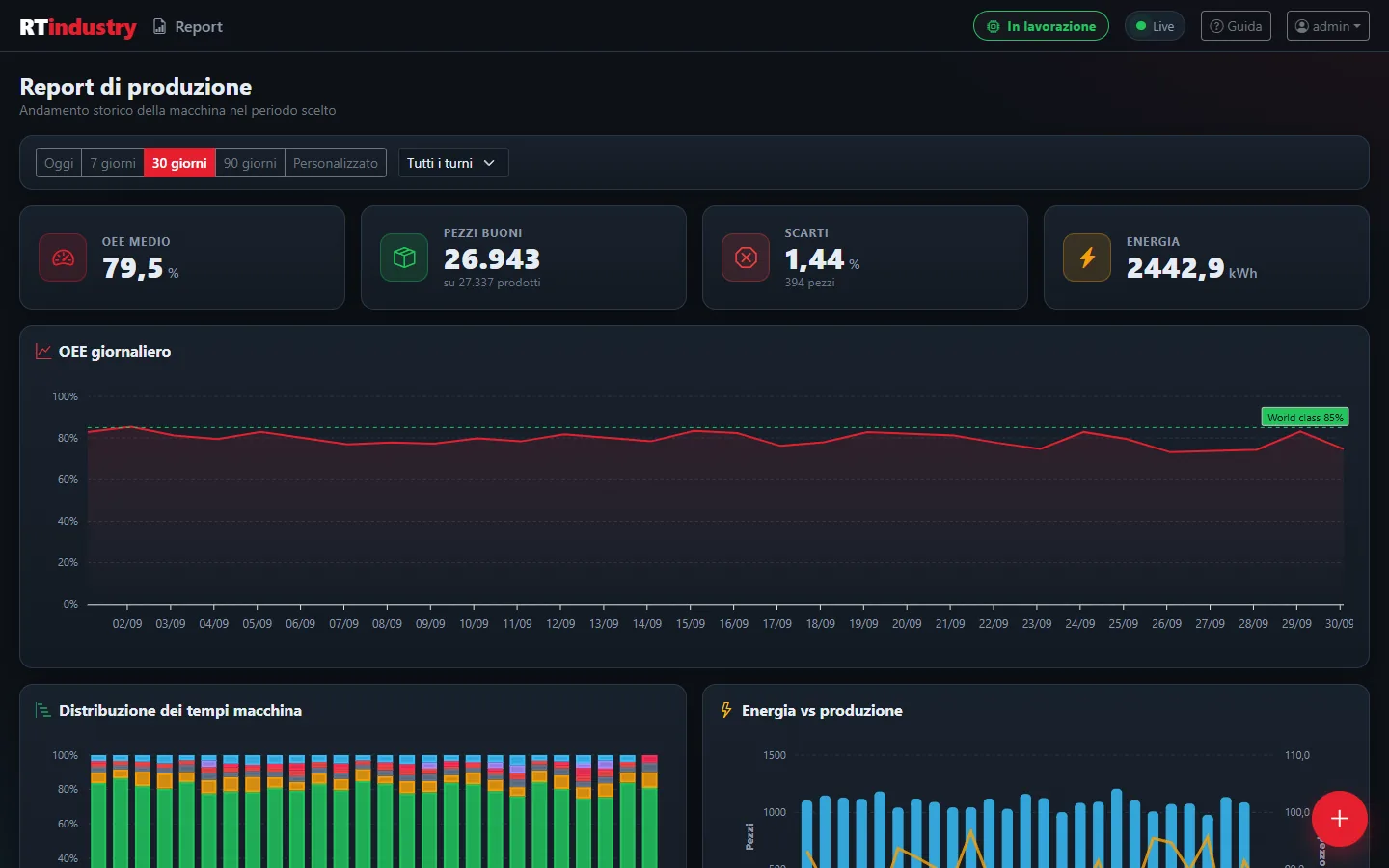
The analysis of a week, a month, a shift
Choose the period and the shift and the numbers are ready for the production meeting, to export to Excel.
- Summaries: average OEE, good parts, scrap, energy
- OEE day by day and distribution of machine time
- Energy compared with production
- List of completed work orders and CSV export
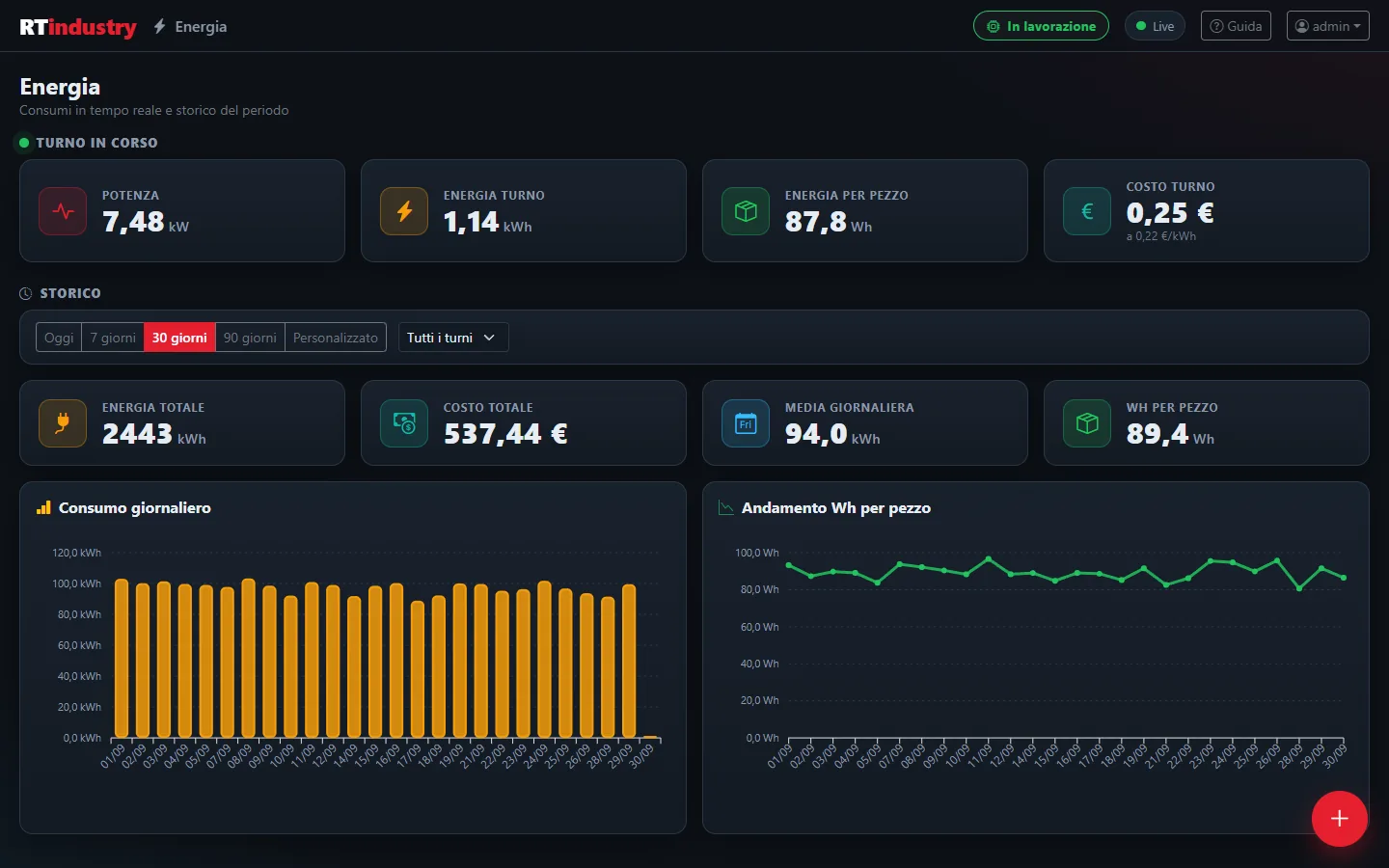
How much the machine consumes, how much each part costs
With an energy meter connected (Modbus too, separate from the machine) RTIndustry measures consumption and links it to production.
- Real time: power, shift energy, Wh per part and shift cost
- History: total energy and cost, average and day-by-day consumption
- Trend of Wh per part
- Configurable energy price (euros per kWh)
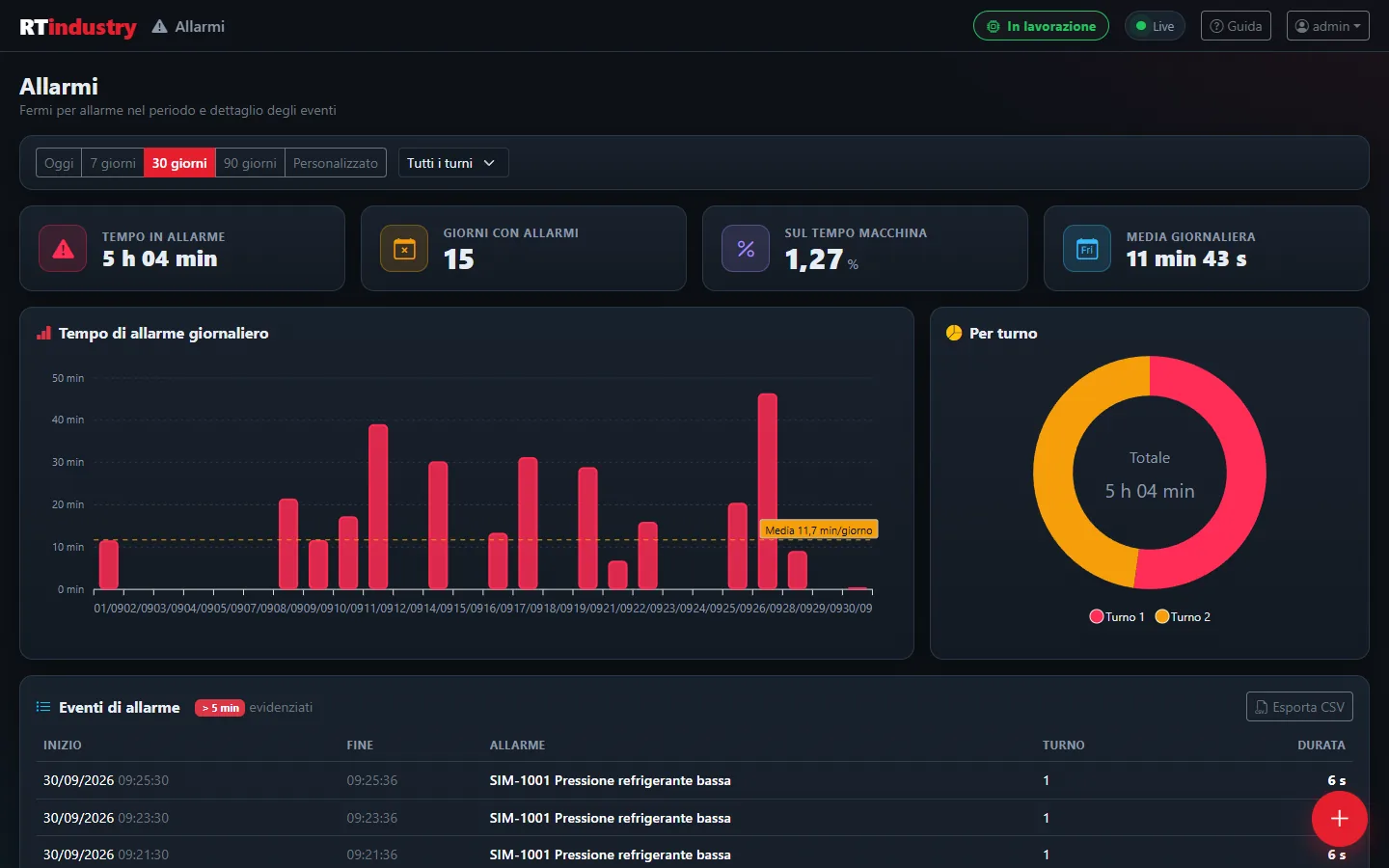
How long in alarm, and for what causes
Every alarm is recorded with start, end and duration. Momentary warnings (under 5 seconds) do not distort the statistics.
- Time in alarm, days with alarms, percentage of machine time
- Daily chart with the average line and breakdown by shift
- Event table with alarms longer than 5 minutes highlighted
- CSV export
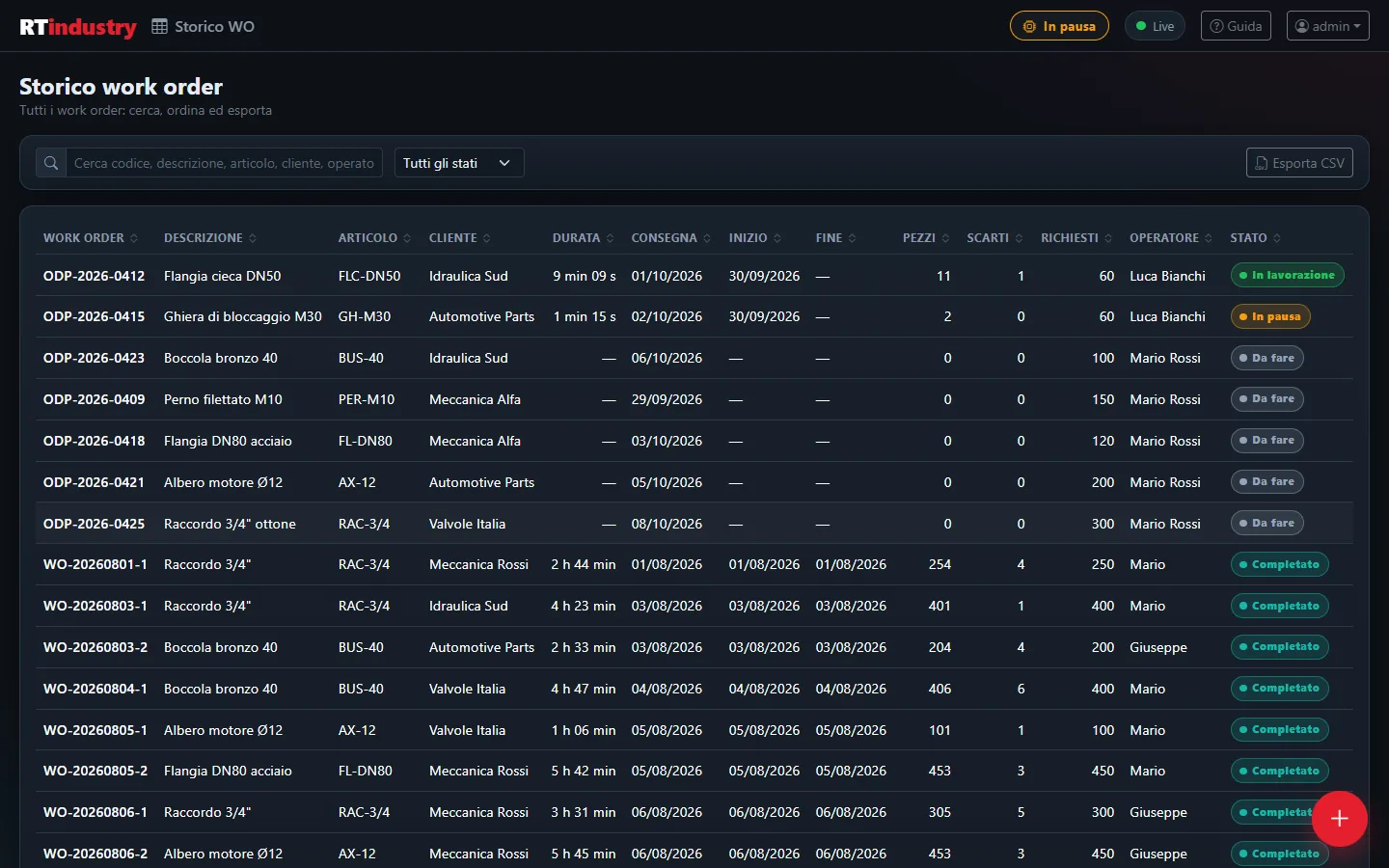
The complete archive of jobs
All work orders, including old ones, with the parts, scrap, times and consumption of each.
- Search by code, description, customer, part number
- Filter by status and sorting on every column
- CSV export of the list you are looking at
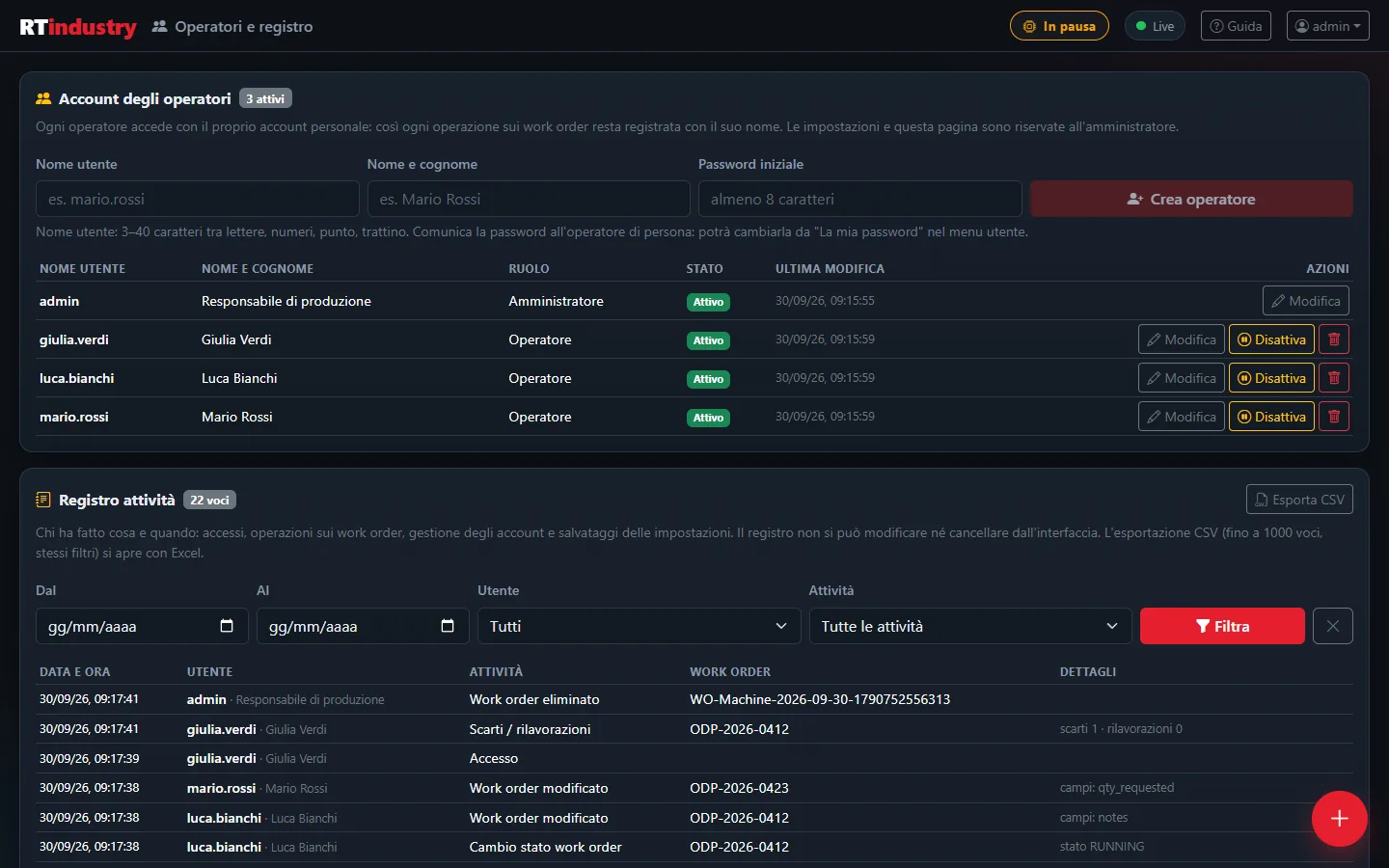
Everyone with their own account, every operation tracked
Each operator signs in with their own username and password. The activity log keeps track of who did what and when: useful for production traceability and as documentation for machinery certification.
- Operator and Administrator roles (only the administrator sees Settings)
- Accounts can be created, edited, deactivated or deleted: activities remain in the log
- Log of sign-ins (including rejected ones), work orders, scrap, accounts and settings
- Filters by period, user and activity, CSV export
- The log cannot be edited or deleted from the interface
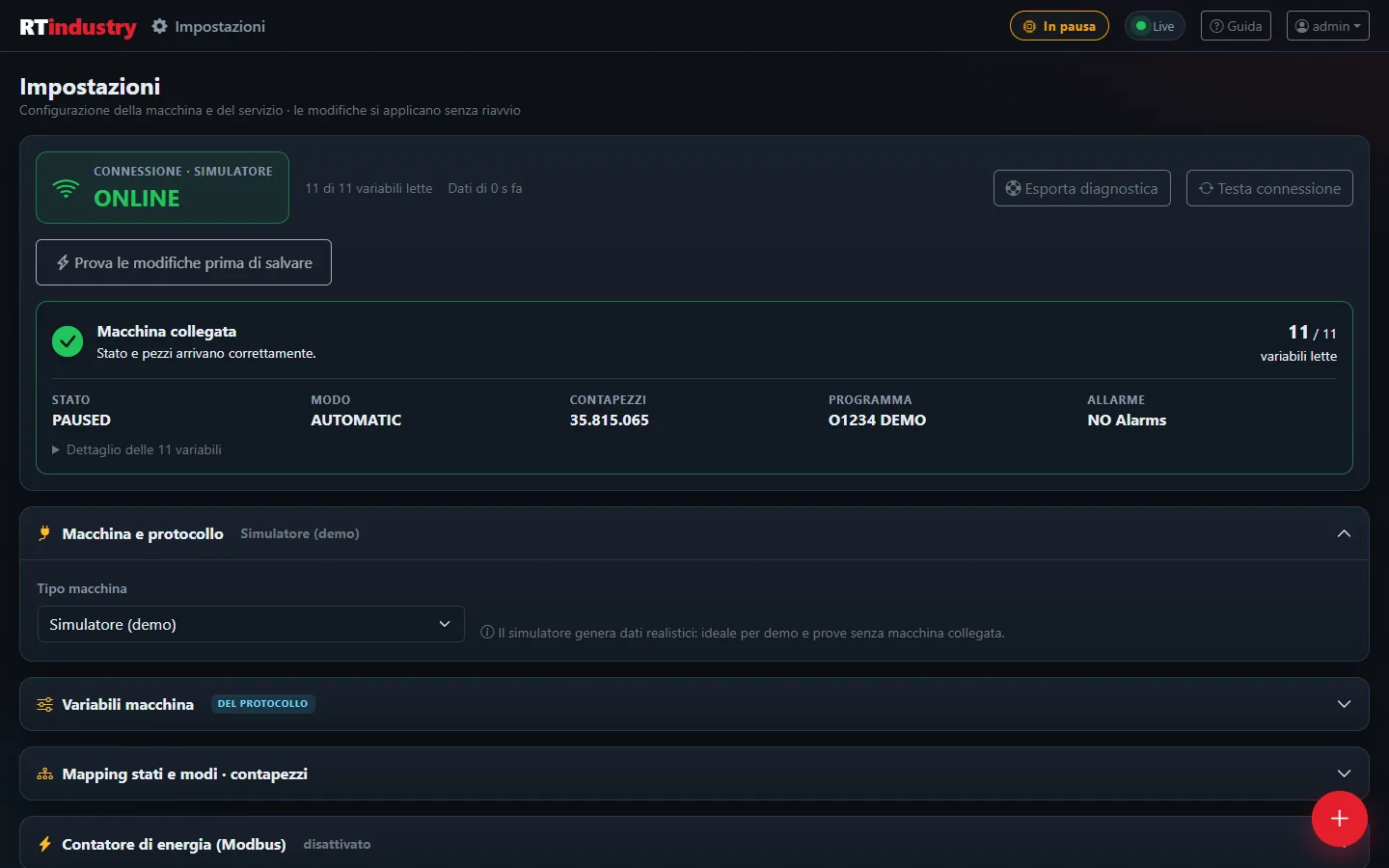
The whole configuration, reserved for the administrator
Changes apply immediately, without restarting anything. A new address or protocol is tested before saving it, without touching the connection in use.
- Live connection status and Test connection button
- Machine and protocol, variables, state mapping and part counter
- Energy meter, shifts, company details, backup, license and proxy
- Work order integration with ERP and MES, folders and sending programs to Heidenhain
- Export diagnostics for support, without passwords
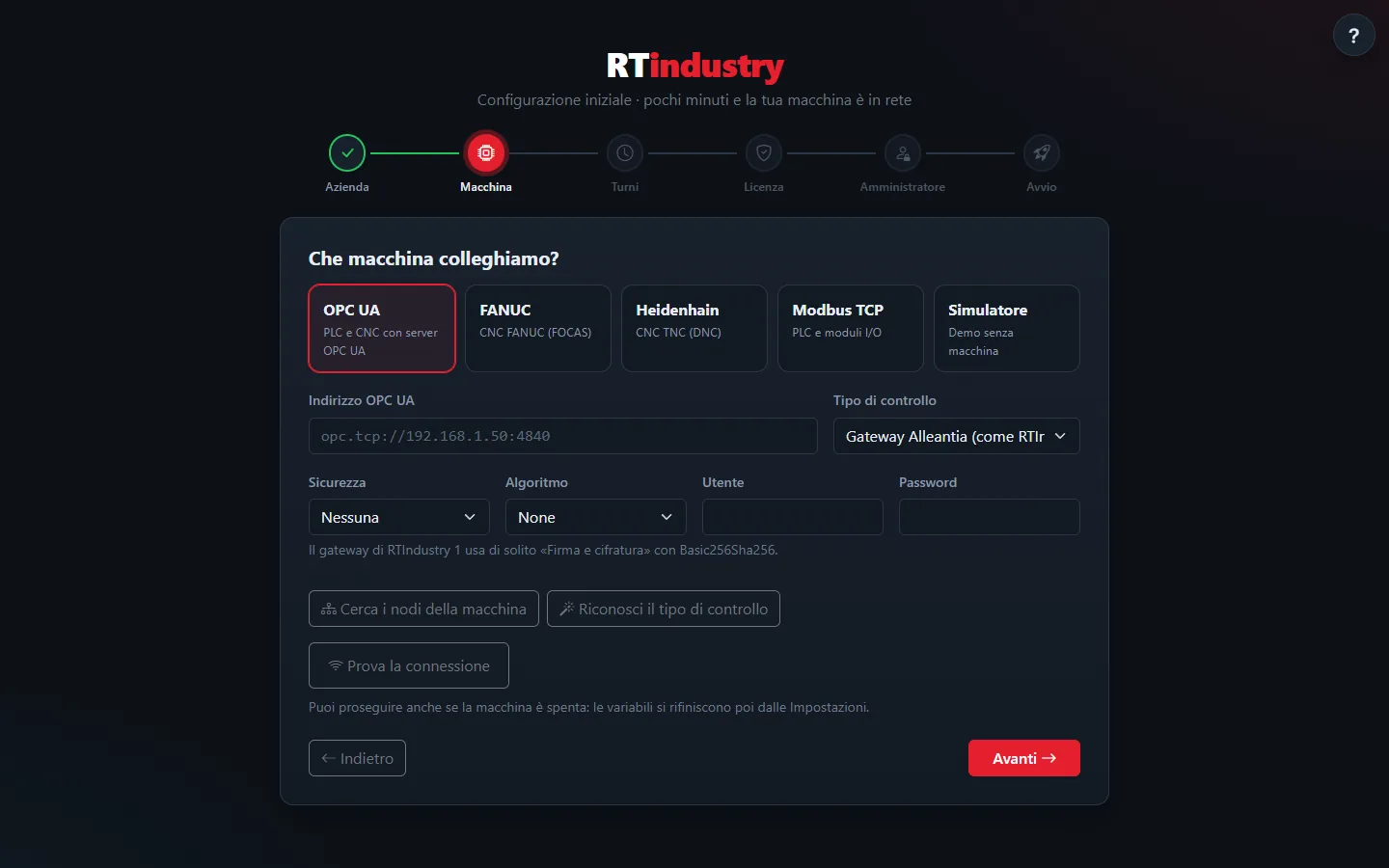
Ready in six steps
Right after installation a wizard prepares everything: if the browser is closed halfway through, it resumes from the step that had been reached.
- Company: name, plant, department, machine and time zone
- Machine: protocol, address and Test the connection
- Shifts, night shifts included
- License (or 30-day free trial), with company proxy if needed
- Administrator and start
Made for the shop floor, not just the office
The interface adapts to the screen: from the office monitor to the tablet mounted next to the machine, all the way to the supervisor's phone. It opens from any device on the company network.
- Tablet mode with large buttons, usable even with gloves
- Large text, readable from a distance
- Keep screen on and full screen, where the device allows it
- “Add to Home screen”: it opens like an app
- Online help: the “?” button on every screen opens the manual at the right place
One software, many machines
RTIndustry talks directly to the machine's control: no add-on boards if the CNC or PLC is already on the network. From a single PC or server you can also monitor several machines together, one instance per machine.
OPC UA
PLCs and CNCs with an OPC UA server: ready-made profiles for Siemens SINUMERIK 840D sl (native nodes verified in the field) and umati machines (OPC 40501), security with signing and encryption.
FANUC FOCAS
FANUC CNCs with built-in Ethernet (port 8193): series 0i-D/0i-F, 30i/31i/32i/35i, 16i/18i/21i, 15/15i.
Heidenhain DNC
TNC 640 and TNC 6xx series, TNC 320, TNC 128, iTNC 530, CNC PILOT, MANUALplus and MillPlus. Parts counted at program end even without the control's part counter. Programs sent to the control.
Modbus TCP
PLCs and I/O modules: holding and input registers, coils and discrete inputs, with a ready-made map or custom registers. Also for energy meters, with a ready-made profile for the IME CE4DT (Conto D4).
Work orders come from the management system
The management system (ERP) or the manufacturing execution system (MES) creates, edits and starts work orders and reads their progress. Three equivalent channels, with the same rules and a log of every operation.
REST API
JSON over HTTP with a dedicated key: create, read, edit, change status and delete work orders.
Exchange table
writewo/readwo tables in the RTIndustry database or in a company MySQL database, compatible with version 1.
MQTT
Built-in broker: outgoing telemetry, work order commands only from authenticated clients, events at every change.
From installation to production in a few minutes
No server to prepare and no external database: all you need is a Windows PC connected to the machine over the network.
Install
The installer creates the RTIndustry Windows service, which starts with the PC and collects data even with the browser closed. Database and daily backups are included.
Configure
The setup wizard asks for company, machine, shifts, license and administrator. “Test the connection” confirms that state and parts are coming in.
Produce
Operators work on the work orders, OEE is calculated automatically and the manager has the numbers to make decisions.
Easy to manage, robust on the shop floor
RTIndustry runs locally on the shop-floor PC. Work orders, history and activity log stay in the company's database.
Those who manage several installations (system integrators and resellers) can use the Site Manager for licenses and centralized monitoring.
A single Windows service
Windows 10/11 or Server 2019 and later, 64-bit. An icon next to the clock tells you at once whether everything is fine.
License verified online
If the connection is missing, RTIndustry keeps working and retries by itself. Company proxy supported.
Automatic backups
Daily copy of the database, plus a backup before every update.
Personal sign-in
An account for each operator, separate roles and a log of operations.
Diagnostics ready
One click exports version, status and latest messages for support, without passwords. A tool checks PC, network and machine before installation.
Online help
The user manual is included in the program and works even without internet.
Machine protocols
Setup steps
Integration channels
Days of free trial
The answers in brief
What is RTIndustry?
RTIndustry is Italian software for real-time monitoring of CNC machines and PLCs. It reads state, part counter, alarms and consumption from the machine, calculates OEE and organizes production in work orders. It is installed as a Windows service and used from the browser on PCs, tablets and phones.
Which machines does it work with?
With CNCs and PLCs reachable over the network through OPC UA (for example Siemens SINUMERIK 840D sl or umati machines), FANUC FOCAS over Ethernet, Heidenhain DNC (TNC 640, TNC 320, iTNC 530 and others) and Modbus TCP. A Modbus energy meter can be connected separately.
Is an external server or database needed?
No. RTIndustry 2.0 is a single Windows service with a built-in database and automatic daily backups: all you need is a 64-bit Windows PC connected to the machine over the network.
How is OEE calculated?
OEE is the product of availability, performance and quality. RTIndustry calculates it automatically: running time compared with available time, parts produced compared with the work order's target cycle time, and good parts compared with total parts.
Does it integrate with an ERP or a MES?
Yes, through three equivalent channels: REST API with a key, a database exchange table compatible with version 1, and MQTT through the built-in broker. Details in the integration guide.
Can I monitor several machines from the same PC?
Yes. One RTIndustry instance per machine is installed on a PC or server (for example 8 instances for 8 machines): each one has its own service, port, data and backups and takes one license seat. The installer suggests the name, folder and free ports by itself.
My machine has no part counter: can I count parts?
Yes. If the control has no part counter (often the case with Heidenhain), RTIndustry counts one part at every program end (M30, M2 or END PGM). Alternatively it reads a counter from the machine's PLC.
Does it work without an internet connection?
Yes. The license is verified online, but if the connection is missing RTIndustry keeps collecting data and retries by itself. If the company reaches the internet through a proxy, it can be entered in the settings.
Can I try it?
Yes: without a license key a 30-day free trial starts. For a demonstration on your machine, write to demo@rtindustry.it.
Ready to digitize your machine shop?
Request a free demo: we will show you RTIndustry in action on your machine, with your data.
Request a demoDemo and information: demo@rtindustry.it · Customer support: assistenza@rtindustry.it